Talk to Sales: +91 9555-396-396
For Support: +91 80-1055-1055
Best WhatsApp Platform for Growing Businesses: A Complete Guide to Reliability, CRM Integration and Automation
If your current WhatsApp provider experiences frequent outages, struggles with CRM integration, cannot handle increasing message volumes, or offers limited support for multiple agents, it may be time to move to a more comprehensive WhatsApp Business platform.
Growing businesses need more than a basic WhatsApp connection. They need a reliable communication platform that can support expanding teams, automate customer interactions, manage bulk promotional campaigns, integrate with existing business systems, and provide actionable insights into customer engagement.
A scalable WhatsApp solution should bring together official WhatsApp Business API access, a shared team inbox, CRM integration, AI-powered chatbots, campaign management, automation and analytics.
Chat ON Desk is an omnichannel messaging and WhatsApp Business API platform designed to help businesses manage customer conversations, automate communication and connect WhatsApp with their existing business systems.
Whether you are managing customer support, generating sales leads, running promotional campaigns or coordinating customer communication across multiple locations, choosing the right platform can significantly improve how your business operates.
In this guide, we explain what makes a WhatsApp platform reliable and scalable, which features growing businesses should look for, how to evaluate providers, and how to choose a solution that supports long-term business expansion.
Why Growing Businesses Outgrow Their Existing WhatsApp Provider
A WhatsApp solution that works for a small team may become a bottleneck as the business expands.
Initially, a business might only need to receive customer inquiries and respond manually. As customer interactions increase, the requirements become more complex.
Sales teams need access to customer conversations. Marketing teams want to send promotional campaigns. Support teams need conversation assignment and performance reporting. Management wants visibility into customer engagement and business results.
When the existing platform cannot support these requirements, businesses start experiencing several operational problems.
1. Frequent outages and unreliable messaging
Messaging interruptions can affect sales, customer support and business operations.
If your WhatsApp provider experiences recurring platform outages, delayed message processing or inconsistent webhook delivery, your team may struggle to communicate with customers when it matters most.
For businesses handling order confirmations, payment reminders, delivery updates and customer inquiries, even short interruptions can create operational difficulties.
A reliable platform should offer infrastructure monitoring, transparent incident communication, appropriate message processing and recovery mechanisms.
It is also important to understand that WhatsApp messaging depends on multiple systems. Meta operates the underlying WhatsApp Business Platform, while your provider manages the additional inbox, automation and integration infrastructure.
No third-party provider can guarantee that Meta’s infrastructure will never experience an outage.
When evaluating providers, examine their own platform reliability separately from Meta’s service availability.
2. Limited CRM integration
When WhatsApp conversations are disconnected from your CRM, sales and support teams lose valuable customer context.
Agents may need to switch between multiple applications to find customer information, previous conversations, purchase history and lead details.
This creates unnecessary work and makes it harder to track sales opportunities.
A growing business needs WhatsApp CRM integration that connects customer conversations with its existing business processes.
For example, when a new customer contacts your business on WhatsApp, the conversation should be associated with the appropriate CRM record. Sales representatives should be able to access previous interactions, follow up with prospects and track opportunities without manually maintaining separate records.
3. Limited multi-agent capabilities
The WhatsApp Business App is useful for businesses with relatively simple communication requirements.
However, growing sales and support teams need more structured conversation management.
Without a shared inbox, agents may respond to the same customer, overlook important inquiries or lose track of unresolved conversations.
A professional WhatsApp platform should support multiple agents, conversation assignment, team collaboration, internal notes and centralized customer history.
4. Inadequate campaign management
Manually sending promotional messages becomes inefficient when your customer database grows.
Marketing teams need the ability to segment audiences, personalize approved WhatsApp templates, schedule campaigns and monitor campaign performance.
Without these capabilities, businesses struggle to execute marketing campaigns consistently.
5. Limited reporting and analytics
Basic message delivery reports are not enough for businesses that want to understand customer engagement and improve conversions.
Management needs visibility into campaign performance, agent productivity, customer response rates, chatbot interactions, lead qualification and customer journey performance.
A comprehensive WhatsApp platform should turn customer communication into actionable business insights.
What Makes a WhatsApp Platform Scalable and Reliable?
Not every WhatsApp Business API provider offers the same capabilities.
Before selecting a solution, evaluate the following eight factors.
1. Official WhatsApp Business Platform Access
The foundation of a professional WhatsApp communication system is access to the official WhatsApp Business Platform.
Businesses can access WhatsApp through Meta’s Cloud API directly or work with an authorized solution provider.
Using the official platform provides access to supported business messaging capabilities, including approved message templates, business messaging APIs, delivery events and quality management.
When selecting a provider, verify its official Meta relationship and understand what additional services it provides.
A provider should ideally offer:
- Official WhatsApp Business Platform onboarding.
- WhatsApp Business Account configuration.
- Message template management.
- Webhook and API connectivity.
- Messaging quality and account monitoring.
- Number migration guidance.
- WhatsApp Business App coexistence, where eligible.
Avoid relying on unofficial QR-code-based automation as the foundation of critical business communication. Such approaches do not provide the same official API framework and can create account and operational risks.
2. Infrastructure Reliability and Uptime
Reliability is one of the most important considerations when choosing a WhatsApp provider.
However, a marketing claim such as 99.9% uptime does not necessarily tell you how reliably the platform performs.
Ask vendors to explain how they monitor their infrastructure, process incoming and outgoing messages, manage temporary failures and communicate incidents.
Important factors include:
Infrastructure monitoring: The provider should monitor platform availability, API performance and message processing.
Message queues: Outgoing messages should be processed through an appropriate messaging architecture, particularly during high-volume campaigns.
Retry mechanisms: Temporary failures should be handled through controlled retries where appropriate, without generating duplicate messages.
Webhook processing: Incoming messages and delivery events should be processed reliably so that CRM records and customer conversations remain synchronized.
Incident communication: Businesses should have a clear way to receive updates when a provider experiences service disruptions.
Backup and recovery: Understand the provider’s backup, recovery and business continuity arrangements.
Before signing a contract, request the provider’s actual uptime history and service-level agreement (SLA), if available.
Check how uptime is measured, which components are covered, what exclusions apply and what happens if the agreed target is missed.
Remember that a provider’s platform availability and Meta’s WhatsApp service availability are two different things.
3. Two-Way CRM and Business System Integration
CRM integration is essential when WhatsApp becomes part of your sales and customer support operations.
A good integration should connect conversations, customer information and business workflows rather than simply provide a button to send WhatsApp messages.
Look for these capabilities:
- Contact synchronization.
- Access to customer and lead records.
- WhatsApp conversation history.
- Lead and deal creation.
- CRM workflow automation.
- Customer activity tracking.
- Custom field mapping where supported.
- API and webhook connectivity.
For example, a sales representative using Zoho CRM should be able to access WhatsApp communication associated with Leads, Contacts and Deals.
A new incoming WhatsApp inquiry can be converted into a CRM lead or deal, while CRM workflows can trigger relevant WhatsApp notifications.
Chat ON Desk provides integrations with business systems including Zoho CRM, Shopify, WooCommerce, Bitrix24, HubSpot, WHMCS and other applications.
It also supports automation connectivity through tools such as Zapier and Make, along with APIs and webhooks for custom workflows.
Chat ON Desk Integrations
WhatsApp and Zoho CRM integration
For businesses using Zoho CRM, Chat ON Desk enables sales teams to send and receive WhatsApp messages from CRM records.
Its Zoho integration supports:
- WhatsApp communication from Leads, Contacts and Deals.
- Incoming message association with CRM records.
- WhatsApp message history.
- Workflow-triggered notifications.
- Lead and Deal creation from incoming conversations.
- Broadcast campaigns from selected CRM records.
This helps sales teams manage customer communication without constantly switching between applications.
WhatsApp Integration With Zoho CRM
4. Shared Inbox and Multi-Agent Management
As your business expands, multiple employees may need to handle WhatsApp conversations simultaneously.
A shared WhatsApp inbox provides a centralized workspace where agents can manage customer inquiries, collaborate and respond from a common platform.
A scalable team inbox should provide:
Conversation assignment: Assign incoming conversations to specific agents or teams.
Team routing: Route inquiries based on department, skill, language or working shift.
Internal notes: Allow agents to share information without exposing internal discussions to customers.
Conversation history: Maintain customer interaction history so that agents have the context required to resolve inquiries.
Customer profiles: Display customer details, recent interactions, order information and assigned agents.
Agent performance: Monitor response times, workload and conversation handling.
Multiple channels: Bring supported communication channels into one centralized inbox.
Chat ON Desk provides a unified team inbox that connects WhatsApp, Facebook, Instagram, Telegram, web chat and other supported communication channels.
Its one-contact-one-thread approach helps teams maintain customer context across connected channels rather than managing every conversation independently.
This is particularly useful for businesses with separate sales, customer support and marketing teams.
Unified WhatsApp Support Inbox
5. High-Volume WhatsApp Messaging and Bulk Campaigns
As your customer database grows, sending promotional and transactional messages individually is no longer practical.
A scalable WhatsApp platform should provide campaign management capabilities that allow businesses to communicate with large groups of opted-in customers.
Important capabilities include:
- Bulk WhatsApp broadcasts.
- Audience segmentation.
- Personalized message templates.
- Scheduled campaigns, where supported.
- API-triggered promotional messages.
- Campaign delivery reporting.
- Automated customer notifications.
- Follow-up workflows.
For example, an e-commerce business can create separate audiences for first-time buyers, repeat customers and customers who have abandoned their carts.
It can then send relevant promotional or transactional messages using the appropriate approved WhatsApp templates.
Campaign performance can be monitored through available message delivery and engagement reports.
Handling peak messaging periods
Festive sales, seasonal promotions, product launches and major marketing campaigns can create sudden increases in messaging volume.
When evaluating a provider, ask:
- What is the platform’s supported message-processing capacity?
- How does it handle campaign queues?
- What happens when Meta applies rate limits?
- How are temporary API failures handled?
- Can the provider support your expected campaign volume?
- How does it monitor failed and pending messages?
Also distinguish your provider’s processing capacity from Meta’s messaging limits and throughput rules. These are separate constraints.
WhatsApp Business Platform messaging limits and throughput depend on Meta’s applicable account and phone-number eligibility.
A provider should help you understand these limitations before a large campaign.
6. AI Chatbots and Automatic Lead Qualification
As businesses receive more customer inquiries, manually responding to every question becomes expensive and inefficient.
AI chatbots and workflow automation can handle repetitive interactions, collect customer information and help sales teams prioritize qualified leads.
A comprehensive WhatsApp platform should support both rule-based automation and AI-powered conversations.
Common use cases include:
Lead capture: Collect names, contact details, product interests and other relevant information.
Lead qualification: Ask qualifying questions about customer requirements, budget, location or purchase timeline.
Automated routing: Assign qualified inquiries to the appropriate sales team.
Customer support: Answer frequently asked questions and provide relevant information.
Appointment scheduling: Collect appointment requirements and guide customers through booking workflows.
E-commerce assistance: Help customers find products, understand order information and receive relevant notifications.
Human handoff: Transfer conversations to a live agent when automation cannot resolve the customer’s requirement.
Chat ON Desk offers no-code chatbot creation and AI-powered automation, allowing businesses to build conversational workflows without developing every interaction from scratch.
Its AI chatbot capabilities can help businesses automate customer inquiries, qualify leads, capture information and connect conversations with CRM and other business systems.
The platform supports multiple AI model options, including OpenAI and Gemini, alongside its automation capabilities.
Example: Automated WhatsApp lead qualification
Consider a company receiving hundreds of product inquiries every day.
Without automation, sales representatives must manually respond to each inquiry and determine whether the customer is a genuine prospect.
With an automated WhatsApp lead qualification workflow:
- A customer sends an inquiry through WhatsApp.
- The chatbot identifies the customer’s requirement.
- It asks relevant questions about product interest, budget and purchase timeline.
- The customer’s responses are captured.
- The lead is categorized according to the configured qualification rules.
- Relevant lead information is sent to the CRM.
- The conversation is assigned to the appropriate sales representative.
This allows sales teams to spend more time engaging qualified prospects rather than manually collecting basic information.
7. Advanced Reporting and Customer Journey Analytics
A growing business needs to understand more than how many WhatsApp messages were sent.
It needs to know how customers interact with campaigns, where conversations are abandoned, how effectively agents respond and whether automated workflows are generating useful leads.
A WhatsApp platform should provide reporting across relevant operational and engagement metrics.
Important reporting areas include:
Campaign analytics
- Messages sent.
- Delivery status.
- Read and response metrics, where available.
- Campaign performance.
- Audience engagement.
Agent performance
- Conversations handled.
- Response times.
- Workload distribution.
- Resolution performance, where tracked.
Chatbot analytics
- Conversation completion rates.
- Customer interaction patterns.
- Drop-off points.
- Lead capture and qualification results.
- Response and conversion metrics, where configured.
Customer engagement
- Conversation history.
- Customer interaction frequency.
- Previous purchases and customer activity, where integrated.
- Customer segmentation.
- Follow-up opportunities.
Understanding the customer journey
Consider an online retailer running a promotional campaign through WhatsApp.
The customer receives a promotional message, clicks the link, visits the website, asks a product question and eventually places an order.
If customer interactions and relevant business events are connected across the messaging platform, website and CRM, the business can gain a clearer understanding of this journey.
It can identify which campaigns generate inquiries, which conversations turn into qualified leads and which customer interactions contribute to sales.
Chat ON Desk combines customer profiles, conversation history, chatbot analytics, campaign reporting and business integrations to help businesses understand customer engagement.
For more advanced attribution, businesses should connect their CRM and website conversion events through the available integrations or APIs.
8. Customer Support, Onboarding and Technical Assistance
Customer support is particularly important when WhatsApp is used for revenue-generating and customer-facing operations.
When evaluating providers, do not consider only the advertised features. Evaluate how the provider helps you implement and operate them.
Ask about:
- Onboarding assistance.
- Technical documentation.
- Integration support.
- Troubleshooting procedures.
- Support availability and working hours.
- Escalation processes.
- Incident communication.
- Migration assistance.
A good provider should understand your business workflows and help configure the platform to meet your requirements.
Chat ON Desk offers onboarding guidance and support for connecting communication channels, configuring integrations, setting up automation and managing customer communication workflows.
Businesses can also use its integration ecosystem to connect existing applications rather than rebuilding their entire technology stack.
Which Type of WhatsApp Solution Is Right for Your Business?
Not every business needs the same type of WhatsApp solution.
The right choice depends on your technical resources, messaging volume, team size and integration requirements.
Solution type
Best suited for
Main consideration
Feature / Channel
WhatsApp Business App
WhatsApp
Individuals and very small teams
SMS
Limited operational and automation capabilities
Feature / Channel
Direct Meta Cloud API
WhatsApp
Businesses with in-house development teams
SMS
Requires building and maintaining the business application layer
Feature / Channel
API-focused provider
WhatsApp
Businesses with existing CRM or helpdesk systems
SMS
May require additional tools for team collaboration
Feature / Channel
Complete WhatsApp communication platform
WhatsApp
Growing sales, support and marketing teams
SMS
Provides a more integrated operational environment
WhatsApp Business App
The WhatsApp Business App is suitable for smaller businesses that primarily need manual customer communication.
However, as the business grows, limitations around structured team management, advanced integrations, automation and centralized reporting can become significant.
Direct WhatsApp Cloud API
Businesses with strong engineering teams can integrate directly with Meta’s Cloud API.
This offers flexibility but requires additional development for shared inboxes, routing, CRM integration, reporting, automation and monitoring.
The engineering and maintenance costs should be considered before choosing this approach.
WhatsApp Business API provider
An API provider can help businesses access WhatsApp Business Platform capabilities and connect them with existing business applications.
However, the capabilities offered by providers vary considerably.
Some focus primarily on API connectivity, while others offer shared inboxes, marketing automation, chatbots and CRM integrations.
Complete WhatsApp communication platform
Businesses with growing sales, marketing and support teams often benefit from a comprehensive platform that combines messaging, automation, integrations and analytics.
Instead of managing several disconnected applications, teams can coordinate customer communication through one workspace.
This is particularly valuable when WhatsApp is an important part of the business’s daily operations.
Why Growing Businesses Choose Chat ON Desk
Chat ON Desk is an omnichannel messaging platform and Meta Business Partner offering WhatsApp Business API access, team inbox capabilities, AI chatbots, broadcasts, automation and business integrations.
The platform is designed to help businesses bring customer communication and operational workflows together.
Here is how Chat ON Desk addresses the requirements of growing businesses.
1. Official WhatsApp Business API access
Chat ON Desk provides official WhatsApp Business Platform onboarding and helps businesses connect their WhatsApp numbers.
Businesses can manage WhatsApp communication through the platform and use supported API capabilities for notifications, customer support, promotional campaigns and automation.
Eligible businesses can also explore WhatsApp Business App coexistence to use the Business App and API together on the same number.
2. Unified omnichannel customer inbox
Rather than managing customer conversations across disconnected applications, businesses can bring supported channels into a centralized inbox.
Chat ON Desk supports channels including:
- WhatsApp.
- Facebook Messenger.
- Instagram.
- Telegram.
- Web chat.
- Other supported messaging channels.
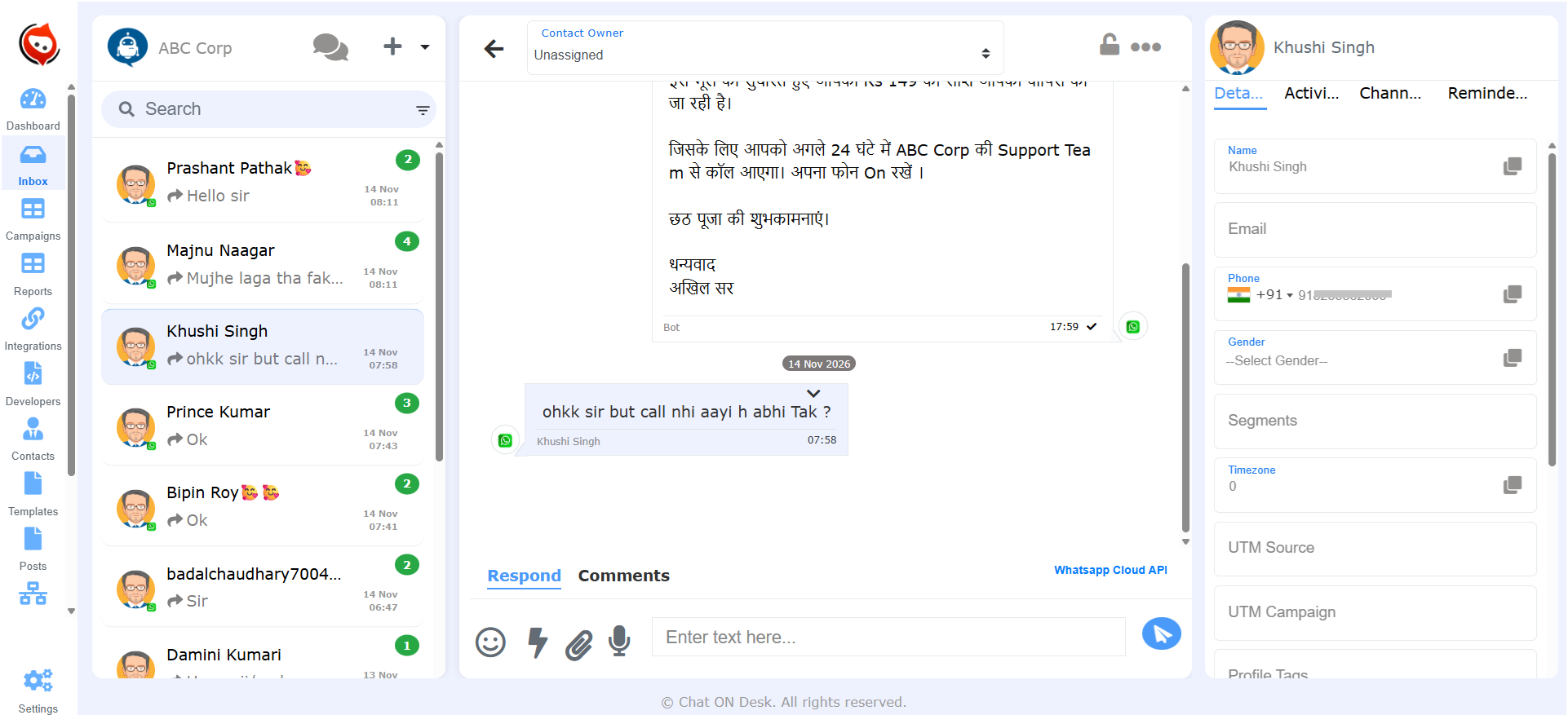
Agents can manage customer conversations, view profiles, access conversation history, assign inquiries and collaborate with other team members.
The one-contact-one-thread approach helps maintain customer context across connected channels.
3. CRM and e-commerce integrations
Chat ON Desk integrates with business applications such as:
- Zoho CRM.
- Shopify.
- WooCommerce.
- Bitrix24.
- HubSpot.
- Kommo.
- WHMCS.
- Google Sheets.
It also supports Zapier, Make, APIs and webhooks for connecting additional systems.
For e-commerce businesses, customer profiles can provide useful context such as order information and recent interactions.
For sales teams, CRM integrations help connect WhatsApp conversations with leads, contacts and opportunities.
Businesses can explore the complete integrations directory.
4. Bulk WhatsApp broadcasts and promotional campaigns
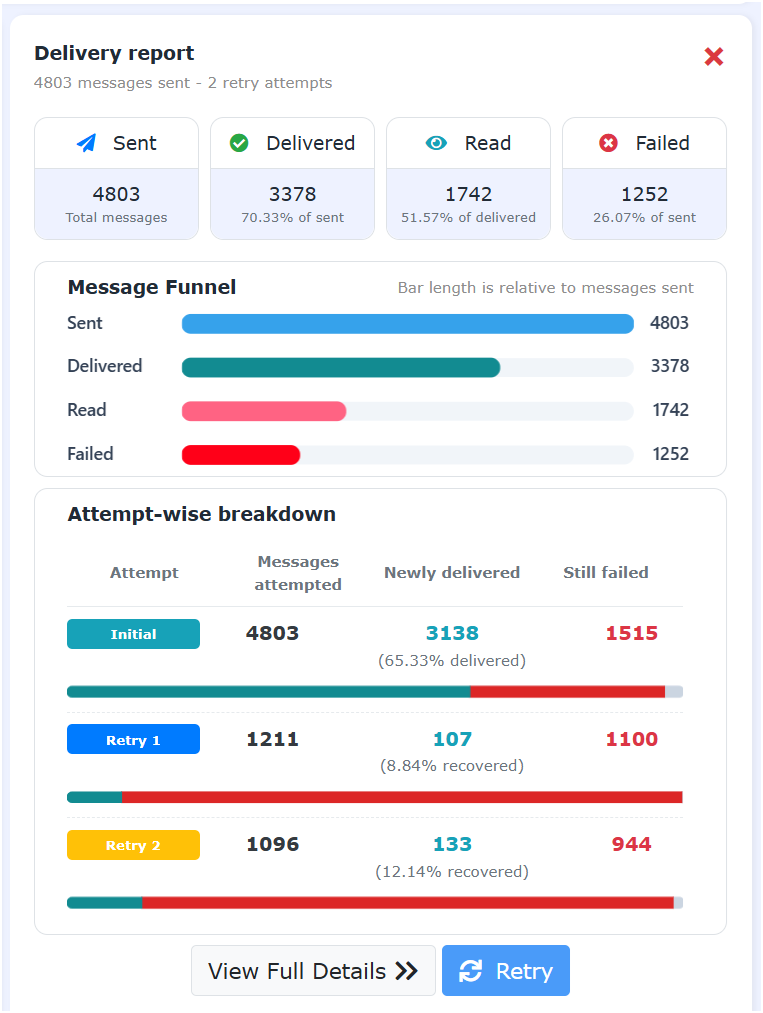
Marketing teams can use Chat ON Desk to send promotional messages to relevant customer segments through WhatsApp broadcasts.
Businesses can use campaigns for:
- Product launches.
- Promotional offers.
- Seasonal sales.
- Customer re-engagement.
- Event invitations.
- Payment reminders.
- Customer notifications.
Messages can also be triggered through supported API integrations and automated workflows.
All business-initiated messaging must follow applicable WhatsApp policies, template requirements and customer opt-in requirements.
5. AI chatbots and automated lead qualification
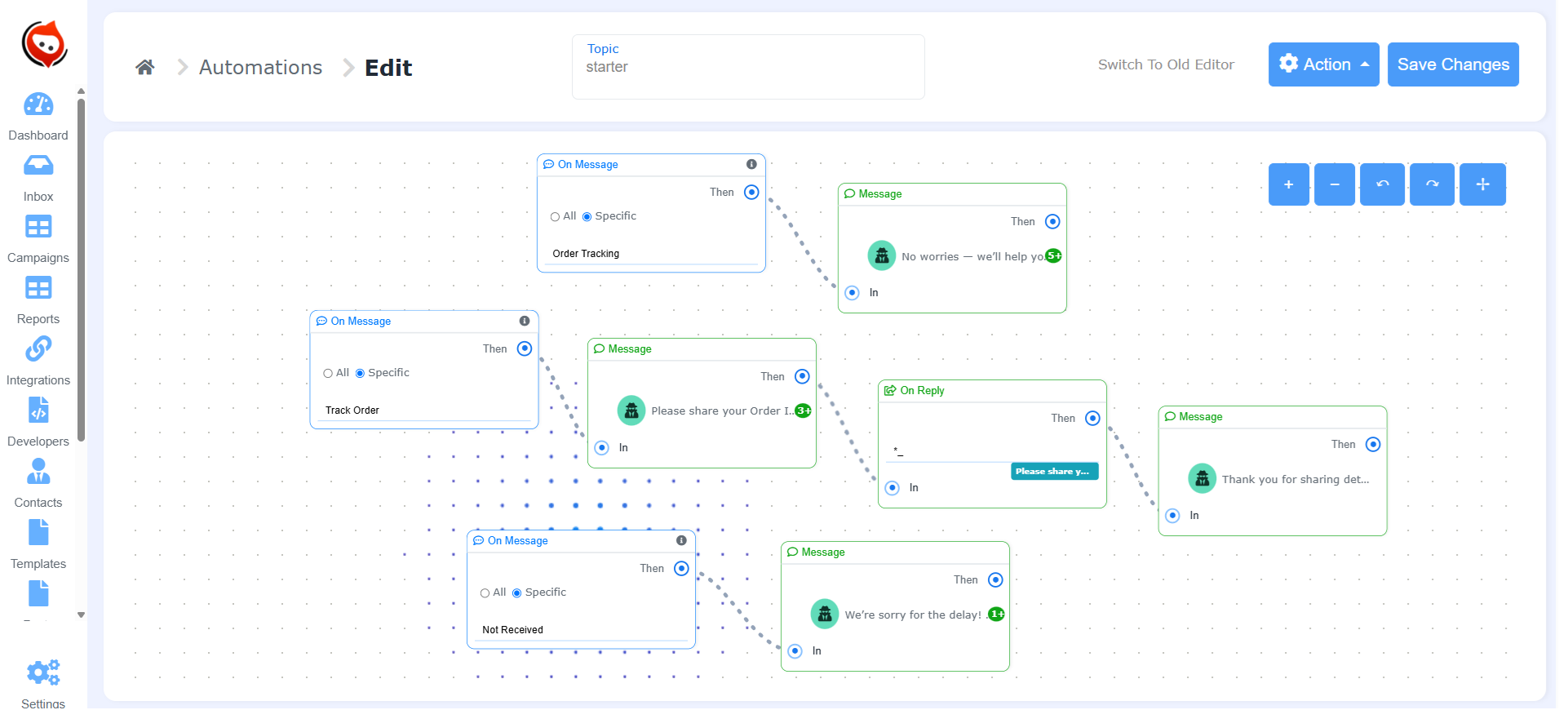
Chat ON Desk provides chatbot capabilities to automate customer interactions.
Businesses can create conversational workflows to collect information, answer frequently asked questions, qualify leads and route inquiries to human agents.
AI-powered chatbots can help handle customer questions while rule-based workflows manage structured processes.
This combination is useful for businesses that want to automate repetitive interactions without removing human involvement from important sales and support conversations.
6. Customer profiles and conversation history
A unified customer profile helps agents understand who they are communicating with.
Chat ON Desk provides customer context such as profile details, order information where integrated, recent conversations, activity history and assigned agents.
This makes it easier for teams to provide more relevant responses and maintain continuity when conversations move between agents.
7. Analytics and operational visibility
Businesses can use available reporting and analytics to understand customer interactions, campaign performance and team operations.
Chatbot analytics can also help identify customer engagement patterns, incomplete conversations and opportunities to improve automated workflows.
By connecting customer communication with CRM and business systems, companies can develop a more complete view of customer engagement and sales activity.
8. Flexible automation and custom integrations
Every growing business has different workflows.
A logistics company may need delivery notifications. An e-commerce company may need abandoned-cart reminders. A financial services company may need customer follow-ups and support automation.
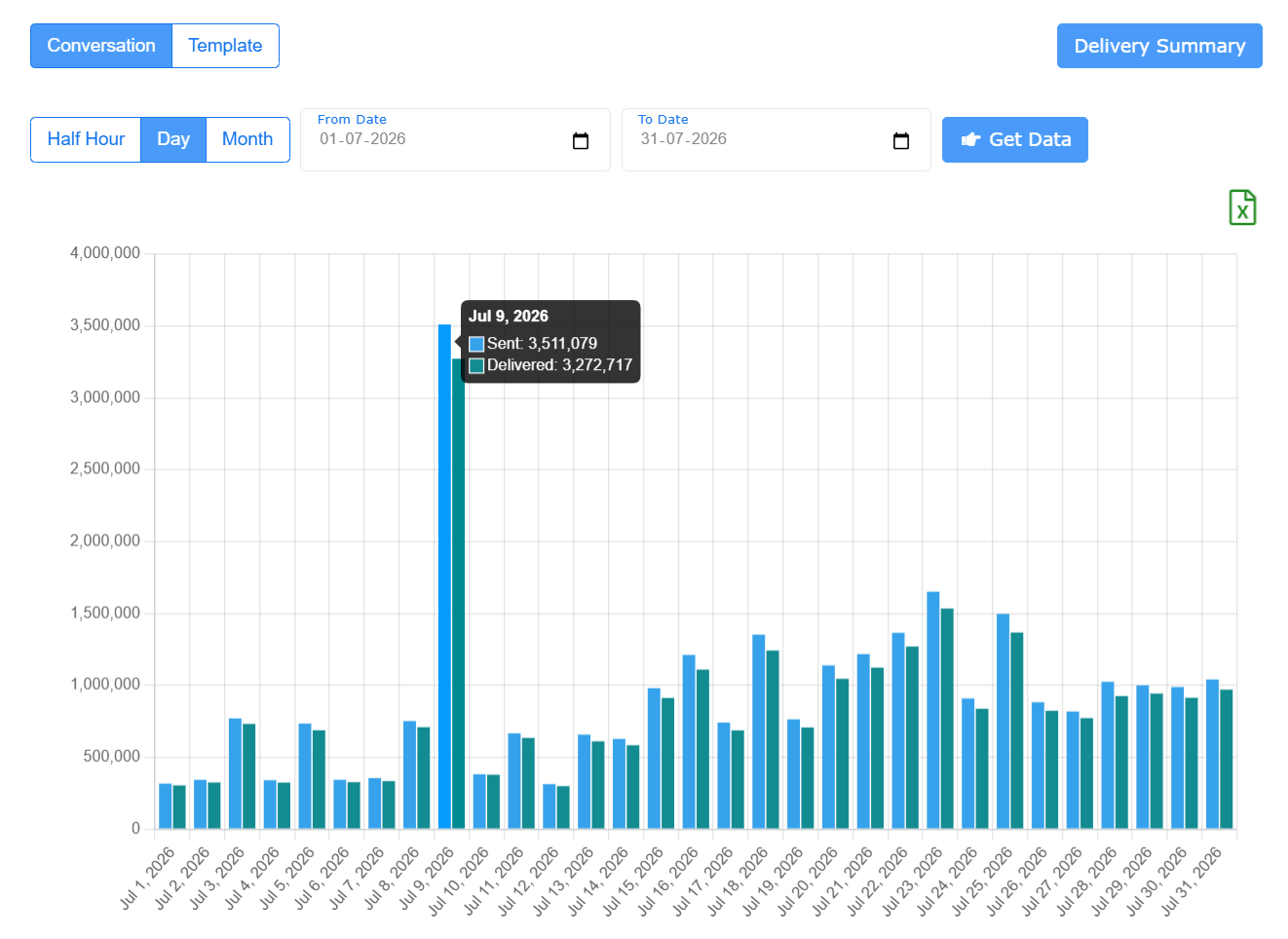
Chat ON Desk supports APIs, webhooks and automation integrations that allow businesses to connect WhatsApp communication with their existing systems.
This makes it possible to build workflows around business-specific requirements instead of relying entirely on manual messaging.
WhatsApp Platform Evaluation Checklist
When comparing WhatsApp providers, avoid choosing based only on subscription price or the number of features shown on a sales page.
Evaluate the actual capabilities available in the plans you are considering.
Evaluation criteria
Best suited for
Feature / Channel
Official API access
WhatsApp
Verified official WhatsApp Business Platform access
Feature / Channel
Reliability
WhatsApp
Uptime history, monitoring and incident communication
Feature / Channel
CRM integration
WhatsApp
Supported CRM connectors and actual synchronization capabilities
Feature / Channel
Shared inbox
WhatsApp
Multi-agent access, assignments and internal collaboration
Feature / Channel
Campaign management
WhatsApp
Bulk broadcasts, segmentation and reporting
Feature / Channel
AI automation
WhatsApp
Chatbots, lead qualification and human handoff
Feature / Channel
Analytics
WhatsApp
Campaign, agent and chatbot reporting
Feature / Channel
Scalability
WhatsApp
Processing capacity, queues and API limits
Feature / Channel
Customization
WhatsApp
APIs, webhooks and automation integrations
Feature / Channel
Customer support
WhatsApp
Onboarding, technical support and escalation procedures
Feature / Channel
Migration
WhatsApp
Number migration and data export arrangements
Feature / Channel
Pricing
WhatsApp
Provider fees, Meta charges and additional costs
When comparing Chat ON Desk with alternatives such as WATI, Interakt, Respond.io or 360dialog, use the same evaluation criteria for every provider.
Request a product demonstration and test the workflows that matter most to your business.
The best platform is the one that meets your actual operational requirements, not necessarily the one with the longest feature list.
Understanding WhatsApp Business API Pricing
WhatsApp Business Platform costs generally consist of Meta messaging charges and the additional charges imposed by your solution provider.
Meta’s pricing depends on factors such as message category and recipient country, while providers may charge subscription, usage, onboarding or additional service fees.
Before selecting a provider, understand the following cost components.
1. Meta messaging charges
Meta applies its WhatsApp Business Platform pricing rules to eligible business messages.
Messaging categories include:
- Marketing.
- Utility.
- Authentication.
- Service.
Pricing depends on the applicable rate card and messaging rules.
These rules have changed over time, so businesses should not rely on old conversation-based pricing examples.
In particular, review the latest rules for service messages and utility templates, including changes effective October 2026.
2. Provider subscription charges
Depending on the provider and selected plan, additional costs may include:
- Monthly or annual subscription.
- Agent or user charges.
- Additional phone numbers.
- Automation features.
- Campaign functionality.
- Premium integrations.
- Additional usage charges.
3. Integration and implementation costs
Businesses with complex CRM, ERP or e-commerce requirements should also account for implementation and customization costs.
Request a complete cost estimate based on your expected messaging volume, number of agents, connected systems and automation requirements.
For current official pricing, consult WhatsApp Business Platform pricing.
How to Switch WhatsApp Providers Without Disrupting Business Operations
Changing your WhatsApp provider can seem complicated, particularly when your business already relies on WhatsApp for sales and support.
However, a properly planned migration can reduce disruption.
Follow these steps.
Step 1: Audit your current WhatsApp setup
Document your existing environment:
- WhatsApp Business Account.
- Connected phone numbers.
- Approved message templates.
- Messaging limits and quality ratings.
- CRM integrations.
- Active campaigns.
- Automated workflows.
- Agent accounts.
- Customer data and conversation history.
Identify the problems you want the new provider to solve.
Step 2: Define your business requirements
Estimate your future requirements rather than selecting a provider based only on current usage.
Consider:
- Expected monthly message volume.
- Number of agents.
- Number of teams and departments.
- CRM and e-commerce integrations.
- Required automation workflows.
- Campaign requirements.
- Reporting and analytics needs.
- Expansion into additional markets or locations.
Step 3: Shortlist providers
Evaluate two or three providers against the same technical and operational requirements.
Ask for a demonstration using your actual workflows.
For example, test a complete process involving an incoming WhatsApp inquiry, CRM lead creation, agent assignment and follow-up notification.
Step 4: Plan number migration
Discuss the number migration process with your existing and prospective providers.
Confirm:
- Business Account eligibility.
- Phone-number requirements.
- Template handling.
- Quality rating and messaging-limit considerations.
- Coexistence eligibility, if applicable.
- Data export and conversation-history arrangements.
Do not assume that all historical conversations, templates or account settings will transfer automatically.
Step 5: Configure integrations and automation
Reconnect your CRM, e-commerce platform and other business applications.
Test incoming and outgoing messages, CRM synchronization, lead assignment, campaign workflows and automated notifications.
Step 6: Run a controlled transition
Where practical, test the new setup with a limited group of agents and workflows before moving your entire operation.
Schedule the transition outside your busiest business period.
Step 7: Monitor performance after migration
Monitor:
- Message delivery status.
- Failed and pending messages.
- CRM synchronization.
- Agent response times.
- Campaign performance.
- Chatbot completion rates.
- Customer feedback.
Continue monitoring closely after the migration to identify and resolve any operational issues.
How to Prepare Your WhatsApp Platform for Future Business Growth
Choosing a scalable provider is only one part of building a reliable communication operation.
Businesses should also prepare their messaging workflows for increasing customer demand.
Here are some practical recommendations.
Maintain customer opt-in records: Send promotional messages only to customers who have provided the required consent.
Monitor message quality: Maintain relevant and useful communication to protect your WhatsApp account’s quality rating.
Plan campaigns in advance: Prepare and approve message templates before major promotional events.
Segment customers: Avoid sending identical messages to every customer when more relevant segmentation is possible.
Automate repetitive inquiries: Use chatbots for frequently asked questions and structured customer interactions.
Monitor integrations: Regularly check API connections, webhook processing and CRM synchronization.
Track agent performance: Use operational reporting to identify workload imbalances and response delays.
Create an incident response process: Define how your team will communicate with customers if WhatsApp or an integrated business system becomes unavailable.
Maintain fallback channels: Consider SMS, email or other communication channels for critical notifications when WhatsApp is temporarily unavailable.
These practices help businesses reduce operational risks while improving customer communication.
FAQs
A reliable WhatsApp platform should provide official WhatsApp Business Platform access, a shared team inbox, CRM integration, messaging automation, monitoring and responsive technical support.
Businesses should evaluate the provider’s own uptime history, incident communication, infrastructure and service commitments rather than relying only on marketing claims.
Chat ON Desk combines WhatsApp Business API access, omnichannel communication, AI chatbots, CRM integrations and team collaboration capabilities.
The best platform depends on your business requirements.
Companies with growing sales and support teams generally benefit from a platform that combines multiple agents, CRM integration, campaign management, AI automation, customer profiles and reporting.
A comprehensive platform can reduce the need to manage separate messaging applications and disconnected workflows.
Yes. The WhatsApp Business Platform supports business-initiated messaging using approved templates, subject to applicable account limits, messaging policies and throughput restrictions.
Businesses should verify their messaging eligibility, quality rating, throughput requirements and provider-side processing capacity before running large campaigns.
Several WhatsApp providers offer CRM integrations, but the depth of integration varies.
Before choosing one, check whether it supports customer synchronization, conversation logging, lead creation, workflow triggers and access to customer records.
Chat ON Desk integrates with systems including Zoho CRM, HubSpot, Bitrix24 and other business applications.
Yes. Businesses can use the WhatsApp Business Platform with a shared team inbox to allow multiple authorized agents to manage conversations.
Depending on the provider, features may include conversation assignment, team routing, internal notes, role-based permissions and agent reporting.
Businesses can use WhatsApp chatbots to ask qualifying questions, collect customer information, categorize inquiries and route prospects to the appropriate sales representatives.
CRM integration can help ensure that captured information becomes part of the sales process.
Chat ON Desk supports AI-powered chatbots and automated conversational workflows for lead capture and qualification.
Yes. Businesses can send promotional WhatsApp messages to eligible, opted-in customers using approved marketing templates.
A campaign management platform can help with audience selection, personalization, campaign execution and performance monitoring.
Important analytics include campaign delivery and engagement, agent response times, conversation volumes, chatbot completion rates, lead qualification and customer interaction history.
Businesses seeking deeper customer journey analytics should connect their messaging platform with CRM and website conversion data.
Yes. WhatsApp can be integrated with e-commerce platforms to support order notifications, customer communication, abandoned-cart workflows and support operations.
Chat ON Desk supports Shopify and WooCommerce integrations, helping businesses connect messaging with their e-commerce operations.
In many cases, businesses can migrate an eligible WhatsApp Business Account and phone number to another provider.
However, the process depends on the existing account configuration and applicable Meta requirements.
Confirm number eligibility, migration steps, templates, messaging limits and conversation-history arrangements with both providers before proceeding.
No third-party provider can guarantee uninterrupted availability of the entire WhatsApp messaging ecosystem because it depends on Meta’s infrastructure, telecommunications networks and connected business systems.
A provider can, however, define its own platform availability commitments, monitoring procedures, incident communication and recovery arrangements.
The total cost generally includes Meta messaging charges and the provider’s subscription or service charges.
The final price depends on message volume, country, message category, number of agents, integrations and additional features.
Always request a cost estimate based on your expected business usage.
Choose a WhatsApp Platform That Grows With Your Business
As your business expands, customer communication becomes increasingly important to sales, marketing and customer support.
A basic messaging tool may be sufficient initially, but growing organizations need a more comprehensive solution that connects conversations with their CRM, automates repetitive work, supports multiple agents and provides actionable business insights.
The right WhatsApp platform should not simply help you send more messages. It should help your organization manage customer relationships, improve team productivity and build more efficient communication workflows.
Chat ON Desk brings WhatsApp Business API access, omnichannel messaging, CRM and e-commerce integrations, bulk campaigns, AI chatbots and workflow automation together in one platform.
Whether you are replacing an unreliable WhatsApp provider, expanding your sales team, automating lead qualification or improving customer engagement, Chat ON Desk provides the tools to bring your communication operations together.